Wednesday, December 30, 2020

Lobethal Lights 2020 - Lobethal - South Australia - Australia

Wish you all a Merry Christmas and a Happy New Year 2021. 

With the interruptions from bush fires in 2019 and cancellation of many events due to the Covid 19 pandemic, I needed to see how the Lobethal Christmas decorations are done.

Lobethal is a city famous for its Christmas lighting for over sixty years and is located 35 KiloMeters from Adelaide city and will take about 45 mins to drive there. Lobethal is up in the Adelaide hills so you should expect to drive in winding roads and to encounter wildlife on road so take care when driving and better drive little bit slower than the allowed maximum speed.

In the true spirit of Christmas this lighting festival has become a tradition and now it has evolved into becoming the largest community Christmas lighting display in the Southern Hemisphere.

Lights will be displayed from 20th December to 31st each year, I encourage all of you to visit Lobethal and support this community event.

   Score out of 5
 1Parking AvailabilityWhen all events are happening it will bit hard to find parking.

3

 2Wheelchair AccessEasy

5

 3AccessibilityMost of the decorations can be enjoyed being inside the car.

4

 4Facilities

Lobethal city facilities will be available.

Toilets – Yes

Barbecue – Yes

4

 5SceneryNothing much when dark.

2


Below is a video I made from the visit.

Map

Thursday, March 19, 2020

Bogoda Falls - Bogoda - Sri Lanka

This is Bogoda falls in Bogoda, Ketawala in Uva province Sri Lanka. When you drive for about 3 kilometres in the Bogoda bridge road from Ketawala town, you will see this waterfall on the road itself, with its water flowing across the road. Since it is a road used by vehicles be mindful when you are enjoying the waterfall. Even though this is not a famous waterfall, you will see plenty of water in the wet season, also since this is on the way to the famous Bogoda Wooden bridge, you will see both of these in the same trip.

Score out of 5
1 Parking Availability By the side of road
2
2 Wheelchair Access Main Viewpoint – No
Secondary Viewpoint – No
Picnic Areas – No
0
3 Accessibility Can see from the road
5
4 Facilities Covered Sitting Areas – No
Toilets – No
Barbecue – No
Garbage Bins – No
0
5 Scenery Waterfall
Stream
2


Map

Sunday, March 08, 2020

Sister - Supahan Sitha (සහෝදරී - සුපහන් සිත)

This is the Sinhala short teledrama "Sister" in the "Supahan Sitha" teledrama series by Ajith Kumarathanthri.
Actors and Actresses
- Hashinika Karaliyadda
- Manjula Moragaha
- Rebecca Godawatte
- Rihanna Kandabadagae
- Herman Jerald Perera

Monday, February 17, 2020

Wednesday, January 01, 2020

Swarna Swara 2019 Adelaide Australia (ස්චර්ණ ස්චර 2019 ඇඩිලේඩ් ඔස්ටේලියාව)

These are some of the performances in Swarna Swara 2019 concert held in Adelaide Australia on 2019-10-06.

Famous Sri Lankan artists Kasun Kalhara, Amarasiri Peris and Nirosha Virajini performed for the music of Suresh Maliyadde.


Tuesday, December 17, 2019

Denuwara Manike Train - Sri Lanka (දෙනුවර මැණිකේ දුම්රිය - ශ්‍රී ලංකාව)

This video is about Denuwara Manike train, which is the newest addition to Sri Lanka railways on late 2019 and was put to service on 1st of November 2019. Currently it is the fastest way to go to Badulla by train. This intercity express train known by train number 1001 will depart Colombo Fort railway station every other day at 6:45 AM and reach Badulla station at 3:30 PM after stopping at 11 stations on the main line. On the next day it will be train number 1002 and will return at 7:20 AM from Badulla station and reach Colombo Fort station at 4:30 PM, after stopping at 12 stations, making a journey of 294.3 kilometres in about 9 hours. Train will stop at Polgahawela, Peradeneya Junction, Gampola, Nawalapitiya, Hatton, Thalawakaelae, Nanuoya, Haputalae, Diyathalawa, Bandarawela, Ella. On the way back it will stop at Maradhana additionally.

Train consists of 2 Air Conditioned first class compartments with adjustable seats, adjustable arm rests, individual tables, television screens, audio jack ports, foot rests, cup holders, seat back pockets, 240 volts power outlets for some seats. 2 second class compartments with adjustable seats, adjustable arm rests, individual tables, foot rests, cup holders, seat back pockets, openable windows, 3 third class compartments, a restaurant car with disabled toilet facilities and 2 identical engines in the front and back with fully air conditioned driver and guard rooms. All compartments are having train information display screens, music, fans, luggage holders and toilets with sinks.
Denuwara Manike has a spacious disabled toilet in the restaurant compartment. Normally the door of this is locked and the restaurant staff got a key for this. It is having automatic door and hand rails for easy access. Good size sink and a mirror is also available. There is a small cubicle with a mirror and a sink near the disabled toilet for public use.

These types of trains are called DMUs which stands for Diesel Multiple Units. This S14 type powerset was manufactured by China Railway Rollingstock Corporation and was purchased for 1845 million rupees. Each of the two 11-cylinder engines can supply 1500 kilowatts to the train through AC – DC power transmission system and they are connected using the train’s electricity system. They are numbered as engine 971 and engine 972 by Sri Lanka railways department. In an engine failure, the train can reach its destination with one operating engine.

For the first time in Sri Lanka this train has a camera system and a Blackbox similar to aircraft Blackbox and records and stores all the operational data with the front camera view. The train information display screen, on this train is made out of LED panel which will display train running information in all 3 languages Sinhala, Tamil and English. It will display information such as train name, number, start and end station names, speed, next stopping station. Engines also got fuel tanks capable of storing 3500 litres of Diesel. Maximum possible speed of the train is 120 kilometres per hour. In the daily run between Colombo and Badulla it reaches 90 kilometres per hour in some sections of the route. To make the ride extra smooth, these carriages are fitted with air suspension system rather than the conventional suspension systems.

Train’s braking system is made by a German company named Knorr-Bremse, who are renowned for manufacturing reliable braking systems especially suited for hill country trains.

Since the train got 2 engines in the front and back, it doesn’t have an observation compartment.

Full route fair for first class is 1700 Sri Lankan rupees, second class is 1000 rupees and 700 rupees for third class. This train will only accept passengers who have booked tickets prior, so you cannot just buy a ticket from a railway station and get in. Tickets can be booked from most of the major railway stations like Colombo Fort, Maradhana, Badulla, Ella, Kandy, Hatton, Mathara, Galle, Anuradhapura, Jaffna. For more information visit Sri Lanka Railways website www.railway.gov.lk.

In the video you can see,
  • Denuwara Manike train passing Uduwara reservoir.
  • Train parked at Badulla station.
  • Denuwara Manike going to Badulla yard to rest for the night.
  • Train passing the famous nine arches bridge.
  • Denuwara Manike passing the highest point in Sri Lanka railway line. This place is about 1898 metres or 6227 feet above mean sea level.
  • Train passing iron bridges and tunnels.


Saturday, September 07, 2019

Kids Ride on Toy Car

Recently I bought a Toy Ride on Car for my kids. These videos are how I fixed the car and how kids enjoy it.


Friday, July 19, 2019

Little Crystal Creek Falls, Crystal Creek, Queensland, Australia

Another interesting waterfall in Queensland is the Little Crystal Creek falls in Crystal Creek. This is made out of 2 to 3 small cascades of water and a pool of water.
This waterfall is located about 75 kilometres North West of Townsville and is reachable in a hour of driving. The road is bit winding after turning from Bruce highway. But it is sealed all the way so a two wheel drive small car would take you there without any problems. When driving from Townsville there is a big car park about 200 metres before the bridge to the left. It can easily accommodate 15 cars so you do not have to worry about finding parking.
At the park there will be 2 boards with maps and details about the area. To reach the waterfall, you need to walk about 150 metres towards the arch bridge from the car park. The bridge is a 18.3 metre long bridge constructed in 1932. There is no separate path but can walk on the left side of the road so be careful if you are travelling with children. You can reach the bridge with a pram or a wheelchair and have a look at the waterfall. But to go anywhere near the water you need to walk down the stairs and some walking on the rocks depending on the side you start walking down. I would say it is an easy 15 minutes walk from the car park. Also you can reach the waterfall starting from any side of the bridge giving you different views of the nature, so you can start from one side and come up from another.
Once you walk down you will be able to see the creek. In the dry season there will be not much water so it will be safe to walk besides the water. Near the bridge there is a table and a bench to sit and relax and have a picnic near the water. Near the car park there are barbecue, toilet and waste disposal facilities as well as a park for children to run around so I would recommend enjoying some food over there.
Score out of 5
1 Parking Availability Adequate
5
2 Wheelchair Access Main Viewpoint – No       
Secondary Viewpoint – No
Picnic Areas – Yes
1
3 Accessibility Easy walk till the bridge and then stairs, total walk for about 15 minutes from car park.         
3
4 Facilities Covered Sitting Areas – No
Toilets – Yes
Barbecue – Yes
Garbage Bins – Yes
4
5 Scenery Waterfall         
Stream
Bridge
3

Hope you will enjoy the video.


Map

Friday, July 12, 2019

CRM Exception message: Principal user (Id=GUID, type=8) is missing prvReadComplexControl privilege (Id=GUID)

Recently one of my customers started getting insufficient permissions messages and having issues accessing files on the CRM.

Exception detail was as below.
Unhandled Exception: System.ServiceModel.FaultException`1[[Microsoft.Xrm.Sdk.OrganizationServiceFault, Microsoft.Xrm.Sdk, Version=8.0.0.0, Culture=neutral, PublicKeyToken=31bf3s344d364e35]]: System.Web.HttpUnhandledException: Microsoft Dynamics CRM has experienced an error. Reference number for administrators or support: #CBE39829Detail:
  <ActivityId>f6dfec3a-6114-4eef-9544-a9396f5d1572</ActivityId>
  <ErrorCode>-2147220970</ErrorCode> 
  <Message>System.Web.HttpUnhandledException: Microsoft Dynamics CRM has experienced an error. Reference number for administrators or support: #CBE39829</Message>
  <Timestamp>:44:42.8709171Z</Timestamp>
  <ExceptionRetriable>false</ExceptionRetriable>
  <ExceptionSource i:nil="true" />
  <InnerFault>
    <ActivityId>GUID</ActivityId>
    <ErrorCode>-2147220960</ErrorCode>   
    <Message>Principal user (Id=GUID, type=8) is missing prvReadComplexControl privilege (Id=GUID)</Message>
    <Timestamp>2019-07-04T07:44:42.8709171Z</Timestamp>
    <ExceptionRetriable>false</ExceptionRetriable>
    <ExceptionSource i:nil="true" />
    <InnerFault i:nil="true" />
    <OriginalException i:nil="true" />
    <TraceText i:nil="true" />
  </InnerFault>
  <OriginalException i:nil="true" />
  <TraceText i:nil="true" />
</OrganizationServiceFault>
The actual error is given in the inner fault section, the same error is logged in the event log of the CRM server as below.
Exception information:
Exception type: CrmException
Exception message: Principal user (Id=GUID, type=8) is missing prvReadComplexControl privilege (Id=GUID)  at Microsoft.Crm.Application.Platform.ServiceCommands.PlatformCommand.XrmExecuteInternal()
   at Microsoft.Crm.Application.Platform.ServiceCommands.RetrieveCommand.Execute()   at Microsoft.Crm.Caching.ComplexControlLoader.LoadCacheData(Guid key, IOrganizationContext context)   at Microsoft.Crm.Caching.CrmMultiOrgCacheBase`2.CreateEntry(TKey key, IOrganizationContext context)   at Microsoft.Crm.Caching.CrmMultiOrgCacheBase`2.LookupEntry(TKey key, IOrganizationContext context)   at Microsoft.Crm.Application.Components.Sdk.InlineEditControls.Web.CompositionLinkControl.GetFlyOutDescriptor()    at Microsoft.Crm.Application.Components.Sdk.InlineEditControls.Web.LinkControl.GetRequiredColumns(Int32 entityTypeCode)   at Microsoft.Crm.Application.Forms.CompositeControlVisitor.HandleColumnProvider(Control control, FormDescriptor formDescriptor)   at Microsoft.Crm.Application.InlineEdit.Mediators.FormMediator.AddControlProperties(ICrmControl crmControl, ControlDescriptor controlDescriptor)   at Microsoft.Crm.Application.InlineEdit.Mediators.FormMediator.ProcessControlHierarchy(Action`2 controlHandler)   at Microsoft.Crm.Application.InlineEdit.Mediators.FormMediator.GetInstance(FormFactor formFactor, FormDescriptor descriptor, Guid processId, Int64 processVersionNumber, IOrganizationContext organizationContext)   at Microsoft.Crm.Application.InlineEdit.ReadFormDataBuilder..ctor(String recordId, String entityTypeCode, Guid formId, FormFactor formFactor)   at Microsoft.Crm.Application.Pages.Form.FormDataPage.Render(HtmlTextWriter writer)   at System.Web.UI.Control.RenderControlInternal(HtmlTextWriter writer, ControlAdapter adapter)   at System.Web.UI.Page.ProcessRequestMain(Boolean includeStagesBeforeAsyncPoint, Boolean includeStagesAfterAsyncPoint)
After a while found the “Complex Control” privileges are listed as “Process Configuration” in CRM security roles. To fix the issue go to CRM Security Roles and open Customization tab. There you will find Process Configuration for which you need to provide Read permission. 

Giving permissions according to the error you see will fix the issue, for example if your error showed your were missing prvCreateComplexControl, then you need to provide Create permissions.
More details about security role UI and privilege mapping can be obtained from the Microsoft article.

Sunday, February 03, 2019

Unable to Enlist in the Transaction

I recently received an error while trying to run a SSIS package in Visual Studio. The full error is seen as below.

Error: The SSIS Runtime has failed to enlist the OLE DB connection in a distributed transaction with error 0x8004D024 "The transaction manager has disabled its support for remote/network transactions.".

This error is happening when a component with transactions try to connect and manipulate data on a remote server.

To avoid this error, two things can be done.

* Remove the transaction handling from the component. – This should be done only if the transactions are not required or as a temporary measure.

You can do this by selecting the properties of the component, also check the package properties to make sure transactions are not enabled at the package level.

For an explanation of the options please visit the URL.

* Configure the Distributed Transaction Coordinator (DTC).

For a component to work correctly with transactions, below two things are required.
1. Running Distributed Transaction Coordinator (DTC) Service

This service should be running on the database server the component connects to and on  the machine where the package is running. This will coordinate the work between two machines / servers.

This can be checked and started by going to Windows Services.

2. Properly configuring the security of DTC.

To make the DTC service work properly, it should be given permission as required. This can be done by opening the Component Services window. In the component services window, navigate to Component Services –> Computers –> My Computer –> Distributed Transaction Coordinator. Right click Local DTC and click on Properties to open properties window.

If you are intending to run any workloads with transactions via any external servers you should enable “Network DTC Access”.

Depending on the situation you should allow Inbound, Outbound or both transaction manager communication options.

For complete list of explanations on each property please refer the following URL.

Tuesday, August 14, 2018

Enable Disk Clean-up

It seems in Windows Server latest versions the good old disk clean up tool is not enabled by default. If you just want it back you can run the below commands in a command prompt to copy the required files.

Copy C:\Windows\winsxs\amd64_microsoft-windows-cleanmgr_31bf3856ad364e35_6.1.7600.16385_none_c9392808773cd7da\cleanmgr.exe C:\Windows\System32\

Copy C:\Windows\winsxs\amd64_microsoft-windows-cleanmgr.resources_31bf3856ad364e35_6.1.7600.16385_en-us_b9cb6194b257cc63\cleanmgr.exe.mui C:\Windows\System32\en-US\

Then create a shortcut pointing to the Disk Clean up tool found in the following path.

C:\Windows\System32\CleanMgr.exe

I did try this on Windows Server 2008 R2 and hope it works as it is or with slight changes on other versions of Windows as well.

Thursday, February 15, 2018

Filtering Results of a Stored Procedure

Recently I needed to filter the results of a Stored Procedure, After some searching I found 2 options for this as below.


1. Using OpenRowSet Command

SELECT * FROM OPENROWSET ('SQLOLEDB', 'Server=ServerName;TRUSTED_CONNECTION=YES;', 'EXEC sp_Who2')

Remember in this method this feature should be enabled in the server.

2. Using Temporary Tables.

-- Creating a temporary table.
CREATE TABLE #tblSPWho2
(SPId INT, Status NVARCHAR(200), LoginName NVARCHAR(200), HostName NVARCHAR(200), BlockedBy NVARCHAR(200), DBName NVARCHAR(200),
Command NVARCHAR(200), CPUTime BIGINT, DiskIO BIGINT, LastBatch NVARCHAR(200), ProgramName NVARCHAR(200), SPId2 INT, RequestId NVARCHAR(200))

-- Inserting the results of the Stored Procedure into the temporary table.
INSERT INTO #tblSPWho2
EXEC sp_Who2

-- Doing the required filtering using the temporary table.
SELECT * FROM #tblSPWho2 WHERE LoginName = 'Domain\UserName'

-- Removing the temporary table.
DROP TABLE #tblSPWho2

SP_Who2 Stored Procedure will bring all the processes that is currently active in SQL server with the relevant information, the above query will filter the results and will only display the processes that are initiated by the given username (Domain\UserName).

Tuesday, December 05, 2017

It is an error to use a section registered as allowDefinition='MachineToApplication' beyond application level. This error can be caused by a virtual directory not being configured as an application in IIS.

Today a friend of mine started getting this error while he tried to deploy his solution to a server. This only started when ‘Precompile during publishing’ option is selected.

image

“Error 20 It is an error to use a section registered as allowDefinition='MachineToApplication' beyond application level. This error can be caused by a virtual directory not being configured as an application in IIS.”

After having a look, I identified this was caused by a temporary copy of a Web.Config file. Earlier developer created a copy of the Web.Config and placed it inside a folder named Backup within the solution. This backup config file had authentication tag (<authentication>), which is a tag that can be only used in global Web.Config file or the Web.Config file in applications root. Due to the presence of authentication tag, compiler started complaining that there is a virtual directory not configured as a application in IIS.

The solution for my friend’s issue was to simply exclude the copy of the Web.Config file from project by right clicking the file. Then the project started deploying happily.

Tuesday, June 27, 2017

Cheap Direct Flights From Australia to Sri Lanka

Have you heard the good news that SriLankan Airlines is going to restart their direct flights to Australia. Yes it is true, SriLankan is going to start direct services between Sri Lanka and Australia from November 2017. They have decided to do this after acquiring brand new aircrafts from Airbus Industries. So when compared to other airlines, you will fly in more recently built modern aircraft with SriLankan.

SriLankan A340

SriLankan A333

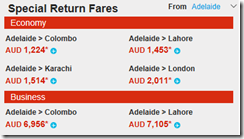
With this new competition I think we will see better fairs to more Asian destinations. Introductory prices for the month of November 2017 from SriLankan seems very good as you see from some of the screenshots I have taken from the web site. Reserve your seats quickly by visiting SriLankan web site.

image

imageimageimageimage

Tuesday, June 20, 2017

Enabling .NET 3.x on Windows 8 and Up

As you may be knowing, now you do not need to separately download and install .Net framework as we used to do with the older .Net frameworks. Since it is coming with Windows, you can just go to “Turn Windows Features On or Off” screen and enable framework you are after. It is simple right?

But in one of the machines it was not that simple for me. The installation tried to download files from Windows Update and was failing mentioning that it cannot get connected to Windows Update when the machine is connected to the internet without any issues.

The solution is to use DISM (Deployment Image Servicing and Management) tool to get it installed.

First you need to find a Windows setup media, a setup DVD or an ISO downloaded will work.

Then use the below command to enable the feature using a local source. Remember to open the Command Window as an Administrator of the machine.

DISM /Online /Enable-Feature /FeatureName:NetFx3 /All /LimitAccess /Source:E:\Sources\sxs

/Online – Targets the currently active and running OS.

/LimitAccess – If some installation files are missing, this will check Windows Update for the missing files. For not to check use /LimitAccess:True.

/Source – Is the location to find the source files, E: is my virtual drive which I mounted the previously downloaded Windows ISO.

If typed correctly, there will be a progress bar showing the installation progress.

image

Wednesday, May 03, 2017

Genoa Falls, Genoa, Victoria, Australia

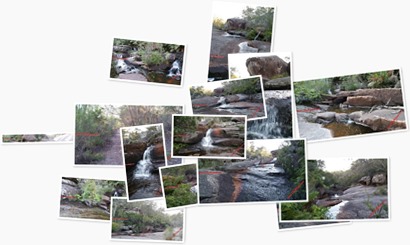
If you are interested in waterfalls and not too fussed about the height, I think you will like Genoa falls in Genoa in the state of Victoria, Australia. Belonging to the Croajingolong National Park, Genoa falls is a set of small cascades of water each with a height of no more than 3 meters, located near the Victorian and New South Wales border.
Genoa falls is located in about 488 kilometers East from the city of Melbourne and can be reached in about 5 and half hours’ drive. Access to the falls is via an unsigned dirt road which can be easily missed. I am sure there are many who are passing in Princess highway daily without knowing there is a small waterfall in this location. After turning to the dirt road, you just need to drive about 200 meters to reach the place to park the car. There is space to park 3 or 4 cars comfortably. This will not be a problem since this is not much of a famous attraction, so you will find space to park your car at any time of the year.
At the car park, there will be a small sign mentioning that you are in the Genoa falls in Croajinolong national park. Camping, open fires and pets are not allowed to make you and others safe at the location. You have to walk about 500 meters to reach Genoa waterfall from the car park, I would say the walk is moderately difficult because the last part descending to the Genoa creek is having one or two steep steps and path is narrow. Better look for reptiles such as snakes and lizards on your way. Keep a good eye at your children if you got them on your trip since the area is hazardous specially with uncovered waterholes.
Once you go down the final set of steps, turn left to reach the main attraction. It is a Basalt floor all the way to the waterfall with random water holes. In dry weather, you will be able to reach the waterfall without getting your feet wet.
After the waterfall the stream will divide into two parts, one will be going behind the boulders and hidden, the other smaller stream will be visible, follow it downstream. In about 30 meters, to your left you will see the other stream joining back with two small waterfalls.
Another good thing is that you can walk the breadth and length of the stream in dry weather without getting wet. When wet, be mindful, the area will be slippery with the algae build-up. I feel the water is bit Ionic from the slight Brown colour seen.
Apart from space to park the car, there are no facilities available on site. So, if you plan to have a barbecue or a picnic, this is not the place. Also, be prepared to carry your garbage out, since there are no garbage bins available.

Score out of 5
1 Parking Availability Adequate

3

2 Wheelchair Access Main Viewpoint – No

Secondary Viewpoint – No

Picnic Areas – No

0

3 Accessibility Moderately difficult walk of about 15 minutes from car park.

2

4 Facilities Covered Sitting Areas – No

Toilets – No

Barbecue – No

Garbage Bins – No

1

5 Scenery Waterfall

Stream

Mountains

3


Hope you will enjoy the video.

Map

Tuesday, May 02, 2017

Agnes Falls - Hazel Park - Victoria - Australia

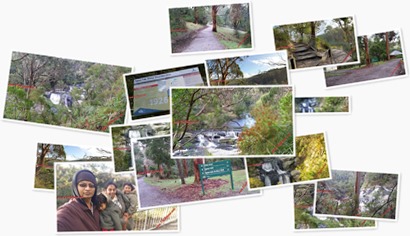
Today I thought to post an article about the highest waterfall in Victoria, which is Agnes Falls in Hazel Park, Hazel Park is a suburb in the state of Victoria in Australia. Agnes falls is located about 200 kilometres South East of Melbourne city, which can be reached in about 2 and half hours’ drive from Melbourne city.

At the end of the Agnes falls road you can park your car and walk for about 100 metres to reach the first viewpoint. This part is mostly downhill so is easily accessible. Walking further 200 metres will get you to the main 2 viewpoints to enjoy the beautiful Agnes falls. There will be bit of uphill walk involved. If needing a break there will be a seat on the way, but nice scenery will facilitate the walking and you will be there in no time

At the end of the short walk you will have to go down few steps, so wheel chair and pram access is not possible. After walking down turning left will take you to viewpoint 2, which overlooks the mountains and the distance Toora windfarm.

All viewpoints are well guarded and safe for little children, but if it is a rainy day, look for puddles of water in the main viewing area otherwise you will end up in wet shoes / feet.

Spanning 59 meters, Agnes falls becomes the highest waterfall in the state of Victoria and has 3 cascades of water. Due to the quality of the water in Agnes river, it is found ideal for domestic use and Agnes river is used as a source of water for the nearby Toora township. The 1924 proposed water supply scheme ensured year-round gravity fed water for the township, and the first part was completed on 1926.

There is wheelchair accessible toilets, few tables with benches and 2 undercover tables with seating to have a picnic. Remember to bring some bags to carry your garbage since there are no waste bins provided.

      Score out of 5
1 Parking Availability Adequate

4

2 Wheelchair Access

Main Viewpoint – No

Secondary Viewpoint – Yes

Picnic Areas – Yes

3

3 Accessibility Easily accessible within about 10 minutes walk from carpark.

4

4 Facilities

Covered Sitting Areas – Yes

Toilets – Yes

Barbecue – No

Garbage Bins – No

3

5 Scenery

Waterfall

Mountains

4

Watch the video and get a feel of the location before you plan your trip to Agnes Falls.

Map

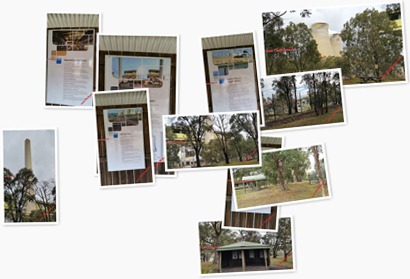
Loy Yang Power Station – Traralgon Victoria – Australia

In my recent travels to Victoria I visited the Loy Yang power station. This power station consists of two sections named as “Loy Yang A” and “Loy Yang B” which was built in 1980s, both these plans are coal fired thermal power stations. Taken together these generate 4300 MW of power which is about 30% of Victoria’s current power needs and is the largest power station in Australia (when taken together). AGL owns and operates Loy Yang A and the adjacent coal mine.

There are no tours to look inside the power station but there is a picnic area where you can see the plants from a distance.

      Score out of 5
1 Parking Availability  

4

2 Wheelchair Access Easy

5

3 Accessibility Easily accessible within about 3 minutes walk from carpark.

4

4 Facilities

No covered sitting areas.

Toilets – No

Barbecue – Yes

2

5 Scenery  

2

Map

Sunday, March 26, 2017

Removing all Partitions from a Disk

Today I thought of writing an article on how to remove all the partitions from a disk so you can re-use the disk.

If you tried removing existing partitions using the Computer Management (type computer management on the start menu to open it) tool in Windows you will find that, you can delete partitions by right clicking on the partition / volume and clicking on Delete Volume option.

image

However you will notice Computer Management is useless on some of the protected volumes since the options to work on them will not be available.In this case you will need to use the DiskPart utility in the Command Prompt.

image

In the Start type Cmd or Command Prompt to open a command prompt. Then type DiskPart, it is a powerful utility which can even work on protected volumes.

In my case, I would like to work on Disk 3 to remove all the existing volumes on it. Below are the steps required to clean the drive.

1. Select the disk.

List all the disks by typing List Disk, this will list all the disks connected and active at the time in your computer including the disks connected via USB ports.

image

Once you identify the disk you need, selection can be made by using the command Select Disk x. In my case Select Disk 3.

To confirm, list all the partitions on the selected list by using the command List Partition.

image

2. Delete all partitions by using the Clean command.

Ensure the proper disk is selected by Listing all disks by command List Disk, the currently focused disk will have a star at the beginning since recovering disks is not easy.

Type Clean and press enter. This will remove all the partitions from the disk. You can check the results by re issuing the List Partition command.

image

Close the DiskPart tool by entering the command Exit.

Computer Management will now show that the disk is uninitialized as below, Initialize the disk and create partitions / volumes as necessary to use it again.

image

Removing a Partition from a Disk

You can remove simple partitions by using the Computer Management tool found in Windows. Search for it on the Start menu to launch it.

But if it is a protected partition you will need to use the tool DiskPart. In the Start menu type Cmd or Command Prompt to open a command prompt. Then type DiskPart, it is a powerful utility which can even work on protected volumes.

To delete one partition, follow the steps.

1. List all disks by using the command List Disk.

2. Select the disk by using Select Disk x command.

3. You can confirm the disk by listing all the partitions on it by using the command List Partition.

4. Select the partition by using the command, Select Partition x command.

5. Delete the partition by command Delete Partition Override.

Override parameter needs to be passed if the partition is not a simple data partition.

You can confirm the deletion by re-listing the partitions on the disk by List Partition command.

image_thumb[15]

Sunday, March 19, 2017

SQL – The target principal name is incorrect. Cannot generate SSPI context.

Recently in one of my Virtual Machine (VM)s I received the above error message when trying to connect to a SQL Server which I used to connect on other times.

image

After having a look I found that the trust between my virtual machine and the domain was broken. You can find the status of the secure channel by using the PowerShell command Test-ComputerSecureChannel.

image

This will also be evident when you try to login to the computer using a domain account. It will generate the following message.

image[6]

To fix this you can try using the below methods.

1. PowerShell

Use the command Test-ComputerSecureChannel.

If your current login has the required access in the domain you can use the below command.

Test-ComputerSecureChannel –Repair

If you need to use another account than the current logged user then you need to use the –Credential parameter when calling the command.

Test-ComputerSecureChannel –Repair –Credential MyDomain\MyUser

2. Joining the domain again.

This will also get fixed by removing the machine from the domain and adding it back. Before removing the computer from the domain make sure you have access to a local administrator account on the computer. Otherwise you will not have a way to login to the computer.

This can be achieved by going to computer system properties,

  1. removing the computer from the current domain,
  2. restarting the computer.
  3. adding the computer to the domain again
  4. restarting the computer

To avoid the two restarts you can try using the following PowerShell commands.

$myPC = Get-WmiObject Win32_ComputerSystem
$myPC.UnjoinDomainOrWorkGroup("Account Password", "Account Username”, 0)
$myPC.JoinDomainOrWorkGroup("Domain", "Account Password", "Account Username", $null, 3)
Restart-Computer -Force

Monday, December 26, 2016

Open Live Writer – Plugin Not Working

While trying to setup and use the Code Plugin by Rich Hewlett I had trouble getting the plugin loaded into Live Writer. I did add the registry entry required as mentioned in the site, but still the plugin did not load.

Registry

Location - HKEY_CURRENT_USER\SOFTWARE\OpenLiveWriter\PluginAssemblies

Key - SyntaxHighlight_WordPressCom_OLWPlugIn

Value - C:\Users\Arjuna\AppData\Local\OpenLiveWriter\Plugins\SyntaxHighlight_WordPressCom_OLWPlugIn.dll

After a while I figured out that, when loading the plugin Live Writer encounters the following error.

"System.IO.FileLoadException: Could not load file or assembly 'file:///C:\Users\Arjuna\AppData\Local\OpenLiveWriter\Plugins\SyntaxHighlight_WordPressCom_OLWPlugIn.dll' or one of its dependencies. Operation is not supported. (Exception from HRESULT: 0x80131515)
File name: 'file:///C:\Users\Arjuna\AppData\Local\OpenLiveWriter\Plugins\SyntaxHighlight_WordPressCom_OLWPlugIn.dll' ---> System.NotSupportedException: An attempt was made to load an assembly from a network location which would have caused the assembly to be sandboxed in previous versions of the .NET Framework. This release of the .NET Framework does not enable CAS policy by default, so this load may be dangerous. If this load is not intended to sandbox the assembly, please enable the loadFromRemoteSources switch. See http://go.microsoft.com/fwlink/?LinkId=155569 for more information.

This is due to a security feature of .Net Framework 4 or later. Before framework 4, if a DLL is downloaded (which is created in another computer), they used to run in full trust in the zone the assembly is running, but with frameworks 4 and later, downloaded DLLs will not run by default. To make them run, simply grant the DLL full access by going to file properties and selecting the Unblock checkbox in the security section as seen in the below image. This will apply to any plugin you download from internet. Also keep in mind to do this to DLLs you trust safe. Otherwise your computer will be unsafe.

image

To troubleshoot plugin and other errors you can refer to Open Live Writer log file located in C:\Users\Arjuna\AppData\Local\OpenLiveWriter\Open Live Writer.log.