Friday, March 05, 2010

Project has Stopped Working

If you create a .NET application to use SQL CE database when you try to run your application on a Windows Vista or Windows 7 machine you might get an error saying your application did stop working, and the error details might show that your are having a problem with System.Data.SQLServerCE.

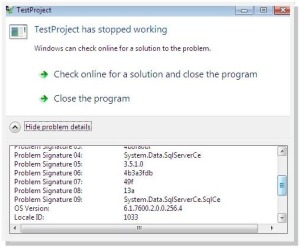
The reason for this is that your system is not having the SQL Server CE runtime in your machine. To fix it what you need to do is to install the Microsoft SQL Server Compact 3.5 Service Pack 1 on your system. You can download it from the following Microsoft link.

http://www.microsoft.com/downloads/details.aspx?FamilyId=DC614AEE-7E1C-4881-9C32-3A6CE53384D9&displaylang=en

Wednesday, February 17, 2010

An error shown when you try to start the SharePoint Search service

After installing the SharePoint Server when you try to start the search service you might end up with the following error.

An unhandled exception occurred in the user interface.Exception Information: OSearch (Administrator)

or

An unhandled exception occurred in the user interface.Exception Information: OSearch (UserName)

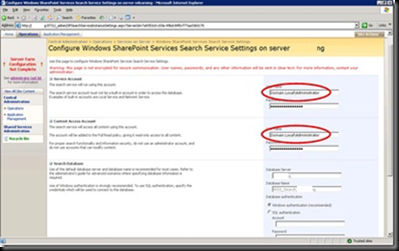
If this comes don’t panic, what you need to do is when providing the username provide it with the full domain name. For example Domain.Local\Administrator.

image

You can find the Microsoft knowledge base article here.

Windows Mobile 7

Highly awaited Windows Mobile 7 is at last showing in horizon.

Have a glance at it by visiting the following URL.

http://www.microsoft.com/presspass/presskits/windowsphone/videoGallery.aspx?contentID=mobileworldcongress2010

http://www.microsoft.com/windowsmobile/en-us/cmpn/windowsphone7series/default.mspx

http://www.windowsphone7series.com/

Microsoft is planning to release phones with Windows Mobile 7 at the end of 2010.

Sunday, February 14, 2010

How Networks Work

I found a really good video which explains how data is travelled in the network. This explains in simple words with animation about the tasks done by the following main components and more.

  • Packet
  • Router
  • Switch
  • Firewall

If anyone is interested in networking I highly recommend you to watch this.

Thursday, February 04, 2010

Making Reliable Connections in BlackBerry Applications

Recently I came up across a blog which provides valuable information on the connections we can make in a BlackBerry application.

If you are interested read more at the following URL.

http://www.localytics.com/blog/post/how-to-reliably-establish-a-network-connection-on-any-blackberry-device/

Tuesday, December 29, 2009

BlackBerry Security Permissions

If you are eager to find out about BlackBerry security permissions and ways to handle prompts following video from BlackBerry will help you in understanding the basics of it.

http://www.blackberry.com/DevMediaLibrary/view.do?name=SecurityPrompts

Further more if you are seeking ways to change application permissions using code, following link will help you to get more details of the Application Permissions class from RIM device API.

http://docs.blackberry.com/en/developers/deliverables/6022/net/rim/device/api/applicationcontrol/ApplicationPermissions.html#PERMISSION_INPUT_SIMULATION

Monday, December 28, 2009

Disabling Date-Time Changes

Do you know that you can programmatically stop the user changing the date and time of a Pocket PC device?

This is useful if your applications need to take time accurately for some reason from the device.

The following code will disable the user from accessing the date time changing settings using his Windows Mobile powered device.


  1. private void btnDisableClock_Click(object sender, EventArgs e)
  2. {
  3.     RegistryKey hklm = Registry.LocalMachine;
  4.     hklm = hklm.OpenSubKey(@"\Software\Microsoft\Clock\", true);
  5.     System.Byte[] offValue = new byte[1];
  6.     offValue[0] = 0x30;
  7.     hklm.SetValue("AppState", offValue);
  8.     lblTitle.Text = "Change Clock Status - Disabled";
  9. }


If you want to re-enable the setting, to make the user able to change the data and time use the below code.


  1. private void btnEnableClock_Click(object sender, EventArgs e)
  2. {
  3.     RegistryKey hklm = Registry.LocalMachine;
  4.     hklm = hklm.OpenSubKey(@"\Software\Microsoft\Clock\", true);
  5.     System.Byte[] offValue = new byte[1];
  6.     offValue[0] = 0x11;
  7.     hklm.SetValue("AppState", offValue);
  8.     lblTitle.Text = "Change Clock Status - Enabled";
  9. }